Page Menu
Home
Phabricator (Chris)
Search
Configure Global Search
Log In
Files
F625626
README.md
No One
Temporary
Actions
View File
Edit File
Delete File
View Transforms
Subscribe
Mute Notifications
Flag For Later
Award Token
Authored By
Unknown
Size
11 KB
Referenced Files
None
Subscribers
None
README.md
View Options
#
PHP
Telegram
Bot
[](https://gitter.im/akalongman/php-telegram-bot?utm_source=badge&utm_medium=badge&utm_campaign=pr-badge&utm_content=badge)
[](https://travis-ci.org/akalongman/php-telegram-bot)
[](https://packagist.org/packages/longman/telegram-bot)
[](https://packagist.org/packages/longman/telegram-bot)
[](https://packagist.org/packages/longman/telegram-bot)
[](https://packagist.org/packages/longman/telegram-bot)
A
Telegram
Bot
based
on
the
official
[
Telegram
Bot
API
](
https
:
//core.telegram.org/bots/api)
###
Introduction
This
is
a
pure
php
Telegram
Bot
,
fully
extensible
via
plugins
.
Telegram
recently
announced
official
support
for
a
[
Bot
API
](
https
:
//telegram.org/blog/bot-revolution) allowing integrators of
all
sorts
to
bring
automated
interactions
to
the
mobile
platform
.
This
Bot
aims
to
provide
a
platform
where
one
could
simply
write
a
plugin
and
have
interactions
in
a
matter
of
minutes
.
The
Bot
can
:
-
retrive
update
with
webhook
and
getUpdate
methods
.
-
supports
all
types
and
methods
according
to
Telegram
API
(
2015
October
8
).
-
handle
commads
in
chat
with
other
bots
.
It
is
ready
for
the
channels
support
.
##
Instructions
###
Create
your
first
bot
1
.
Message
@
botfather
https
:
//telegram.me/botfather with the following
text
:
`
/
newbot
`
If
you
don
'
t
know
how
to
message
by
username
,
click
the
search
field
on
your
Telegram
app
and
type
`
@
botfather
`
,
you
should
be
able
to
initiate
a
conversation
.
Be
careful
not
to
send
it
to
the
wrong
contact
,
because
some
users
has
similar
usernames
to
`
botfather
`
.
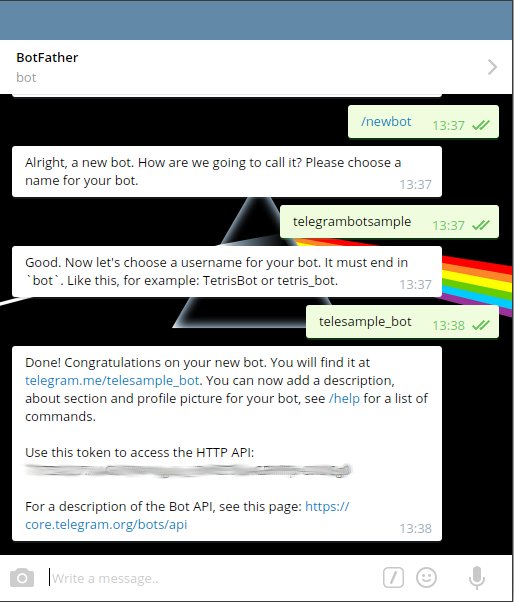
2
.
@
botfather
replies
with
`
Alright
,
a
new
bot
.
How
are
we
going
to
call
it
?
Please
choose
a
name
for
your
bot
.
`
3
.
Type
whatever
name
you
want
for
your
bot
.
4
.
@
botfather
replies
with
`
Good
.
Now
let
'
s
choose
a
username
for
your
bot
.
It
must
end
in
`
bot
`
.
Like
this
,
for
example
:
TetrisBot
or
tetris_bot
.
`
5
.
Type
whatever
username
you
want
for
your
bot
,
minimum
5
characters
,
and
must
end
with
`
bot
`
.
For
example
:
`
telesample_bot
`
6
.
@
botfather
replies
with
:
Done
!
Congratulations
on
your
new
bot
.
You
will
find
it
at
telegram
.
me
/
telesample_bot
.
You
can
now
add
a
description
,
about
section
and
profile
picture
for
your
bot
,
see
/
help
for
a
list
of
commands
.
Use
this
token
to
access
the
HTTP
API
:
<
b
>
123456789
:
AAG90e14
-
0
f8
-
40183
D
-
18491
dDE
</
b
>
For
a
description
of
the
Bot
API
,
see
this
page
:
https
:
//core.telegram.org/bots/api
7
.
Note
down
the
'
token
'
mentioned
above
.
8
.
Type
`
/
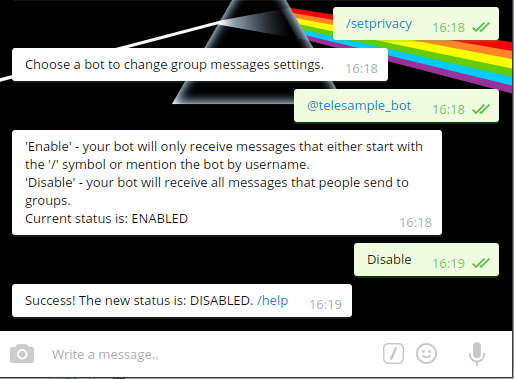
setprivacy
`
to
@
botfather
.
9
.
@
botfather
replies
with
`
Choose
a
bot
to
change
group
messages
settings
.
`
10
.
Type
`
@
telesample_bot
`
(
change
to
the
username
you
set
at
step
5
above
,
but
start
it
with
`
@`)
11. @botfather replies with
'Enable' - your bot will only receive messages that either start
with the '/' symbol or mention the bot by username.
'Disable' - your bot will receive all messages that people send to groups.
Current status is: ENABLED
12. Type `
Disable
`
to
let
your
bot
receive
all
messages
sent
to
a
group
.
This
step
is
up
to
you
actually
.
13
.
@
botfather
replies
with
`
Success
!
The
new
status
is
:
DISABLED
.
/
help
`
###
Require
this
package
with
Composer
Install
this
package
through
[
Composer
](
https
:
//getcomposer.org/).
Edit
your
project
'
s
`
composer
.
json
`
file
to
require
`
longman
/
telegram
-
bot
`
.
Create
*
composer
.
json
*
file
:
```
js
{
"name"
:
"yourproject/yourproject"
,
"type"
:
"project"
,
"require"
:
{
"php"
:
">=5.4.0"
,
"longman/telegram-bot"
:
"*"
}
}
```
And
run
composer
update
**
Or
**
run
a
command
in
your
command
line
:
```
composer
require
longman
/
telegram
-
bot
```
###
Choose
how
to
retrieve
Telegram
updates
The
bot
can
handle
updates
with
**
webhook
**
or
**
getUpdate
**
method
:
|
|
Webhook
|
getUpdate
|
|
----
|
:----:
|
:----:
|
|
Description
|
Telegram
send
the
update
directy
to
your
host
|
Yuo
have
to
fetch
Telegram
updates
|
|
Host
with
https
|
Required
|
Not
required
|
|
Mysql
|
Not
required
|
Required
|
##
Webhook
installation
You
need
server
with
https
and
composer
support
.
You
must
set
a
[
WebHook
](
https
:
//core.telegram.org/bots/api#setwebhook).
Create
*
set
.
php
*
(
just
edit
*
example
-
set
.
php
*)
and
put
into
it
:
```
php
<?
php
//Composer Loader
$
loader
=
require
__DIR__
.
'
/
vendor
/
autoload
.
php
'
;
$
API_KEY
=
'
your_bot_api_key
'
;
$
BOT_NAME
=
'
namebot
'
;
$
link
=
'
https
:
//yourdomain/yourpath_to_hook.php';
try
{
// create Telegram API object
$
telegram
=
new
Longman
\
TelegramBot
\
Telegram
($
API_KEY
,
$
BOT_NAME
);
// set webhook
$
result
=
$
telegram
->
setWebHook
($
link
);
if
($
result
->
isOk
())
{
echo
$
result
->
getDescription
();
}
}
catch
(
Longman
\
TelegramBot
\
Exception
\
TelegramException
$
e
)
{
echo
$
e
;
}
```
And
open
your
*
set
.
php
*
via
browser
.
After
,
create
*
hook
.
php
*
(
or
just
edit
*
example
-
hook
.
php
*)
and
put
:
```
php
<?
php
$
loader
=
require
__DIR__
.
'
/
vendor
/
autoload
.
php
'
;
$
API_KEY
=
'
your_bot_api_key
'
;
$
BOT_NAME
=
'
namebot
'
;
try
{
// create Telegram API object
$
telegram
=
new
Longman
\
TelegramBot
\
Telegram
($
API_KEY
,
$
BOT_NAME
);
// handle telegram webhook request
$
telegram
->
handle
();
}
catch
(
Longman
\
TelegramBot
\
Exception
\
TelegramException
$
e
)
{
// log telegram errors
// echo $e;
}
```
###
Self
Signed
Certificate
To
upload
the
certificate
add
the
certificate
path
as
param
in
*
set
.
php
*:
```
php
$
result
=
$
telegram
->
setWebHook
($
url
,
$
certificate_path
);
```
##
getUpdate
installation
You
need
the
database
Mysql
active
.
Create
*
getUpdateCLI
.
php
*
(
just
edit
*
example
-
getUpdateCLI
.
php
*)
and
put
into
it
:
```
php
#!/
usr
/
bin
/
env
php
<?
php
$
loader
=
require
__DIR__
.
'
/
vendor
/
autoload
.
php
'
;
$
API_KEY
=
'
your_bot_api_key
'
;
$
BOT_NAME
=
'
namebot
'
;
$
credentials
=
array
(
'
host
'
=>
'
localhost
'
,
'
user
'
=>
'
dbuser
'
,
'
password
'
=>
'
dbpass
'
,
'
database
'
=>
'
dbname
'
);
try
{
// create Telegram API object
$
telegram
=
new
Longman
\
TelegramBot
\
Telegram
($
API_KEY
,
$
BOT_NAME
);
$
telegram
->
enableMySQL
($
credentials
);
// handle telegram getUpdate request
$
telegram
->
handleGetUpdates
();
}
catch
(
Longman
\
TelegramBot
\
Exception
\
TelegramException
$
e
)
{
// log telegram errors
echo
$
e
;
}
```
give
to
the
file
the
permission
for
execution
:
```
chmod
775
getUpdateCLI
.
php
```
then
run
```
./
getUpdateCLI
.
php
```
###
Types
All
types
implemented
according
to
Telegram
API
(
2015
October
8
).
###
Methods
New
!
All
methods
implemented
according
to
Telegram
API
(
2015
October
8
).
###
Send
Photo
To
send
a
local
photo
provide
the
file
path
as
second
param
:
```
php
$
data
[
'
chat_id
'
]
=
$
chat_id
;
$
result
=
Request
::
sendPhoto
($
data
,$
this
->
telegram
->
getUploadPath
().
'/'
.
'
image
.
jpg
'
);
```
If
you
know
the
file_id
of
a
previously
uploaded
file
,
just
provide
it
in
the
fist
param
:
```
php
$
data
[
'
chat_id
'
]
=
$
chat_id
;
$
data
[
'
photo
'
]
=
$
file_id
;
$
result
=
Request
::
sendPhoto
($
data
);
```
*
sendAudio
*,
*
sendDocument
*,
*
sendSticker
*,
*
sendVideo
*
and
*
sendVoice
*
works
in
the
same
way
.
See
*
ImageCommand
.
php
*
for
a
full
example
.
####
Send
Chat
Action
```
php
Request
::
sendChatAction
([
'
chat_id
'
=>
$
chat_id
,
'
action
'
=>
'
typing
'
]);
```
####
getUserProfilePhoto
Retrieve
the
user
photo
,
see
the
*
WhoamiCommand
.
php
*
for
a
full
example
.
####
GetFile
and
dowloadFile
Get
the
file
path
and
download
it
,
see
the
*
WhoamiCommand
.
php
*
for
a
full
example
.
####
Send
message
to
all
active
chats
To
do
this
you
have
to
enable
the
Mysql
connection
.
Here
'
s
an
example
of
use
:
```
php
$
results
=
$
telegram
->
sendToActiveChats
(
'
sendMessage
'
,
//callback function to execute (see Request.php methods)
array
(
'
text
'
=>
'
Hey
!
Checkout
the
new
feature
!!
'
),
//Param to evaluate the request
true
,
//Send to chats (group chat)
true
,
//Send to users (single chat)
null
,
//'yyyy-mm-dd hh:mm:ss' date range from
null
//'yyyy-mm-dd hh:mm:ss' date range to
);
```
##
Utilis
###
MySQL
storage
(
Recomended
)
If
you
want
insert
in
database
messages
/
users
/
chats
for
further
usage
in
commands
,
create
database
and
import
*
structure
.
sql
*
and
enable
Mysql
support
after
object
creation
and
BEFORE
handle
method
:
```
php
$
credentials
=
array
(
'
host
'
=>
'
localhost
'
,
'
user
'
=>
'
dbuser
'
,
'
password
'
=>
'
dbpass
'
,
'
database
'
=>
'
dbname
'
);
$
telegram
->
enableMySQL
($
credentials
);
```
You
can
set
a
custom
prefix
to
all
the
tables
while
you
are
enabling
Mysql
:
```
php
$
telegram
->
enableMySQL
($
credentials
,
$
BOT_NAME
.
'_'
);
```
###
Commands
The
bot
is
able
to
recognise
commands
in
chat
with
multiple
bot
(/
command
@
mybot
).
It
can
execute
command
triggering
a
chat
event
.
Here
'
s
the
list
:
-
Group
chat
created
(**
GroupchatcreatedCommand
.
php
**)
-
New
chat
participant
(**
NewchatparticipantCommand
.
php
**)
-
Delete
chat
photo
(**
DeletechatphotoCommand
.
php
**)
-
New
chat
title
(**
NewchattitleCommand
.
php
**)
-
Left
chat
participant
(**
LeftchatparticipantCommand
.
php
**)
**
GenericCommand
.
php
**
let
you
handle
commands
that
don
'
t
exist
or
to
use
commands
as
a
variable
:
Favourite
colour
?
**/
black
,
/
red
**
Favourite
number
?
**/
1
,
/
134
**
**
GenericmessageCommand
.
php
**
let
you
handle
any
type
of
message
.
Maybe
you
would
like
to
develop
your
own
commands
.
A
good
practice
is
to
store
them
outside
*
vendor
/*. This can be done adding the method:
```php
$COMMANDS_FOLDER = __DIR__.'/Commands/';
$telegram->addCommandsPath($COMMANDS_FOLDER);
```
Inside *CommandsExamples/* there are some sample that show how to use types.
### Admin Commands
Enabling this feature, the admin bot can perform some super user command like:
- Send message to all chats
- List all the chats started with the bot (new!)
You can specify one or more admin with this option:
```php
$telegram->enableAdmins(array('TelegramUserID','Othersid'));
```
Telegram user id can be retrieved with the command **/whoami**.
Admin commands are stored in *src/Admin/* folder.
To know all the commands avaiable type **/help**.
### Commands Configuration
With this method you can set some command specified parameters, for
example, google geocode/timezone api key for date command:
```php
$telegram->setCommandConfig('date',
array('google_api_key'=>'your_google_api_key_here'));
```
### Upload and Download directory
You can overwrite the default Upload and download directory with:
```php
$telegram->setDownloadPath("yourpath/Download");
$telegram->setUploadPath("yourpath../Upload");
```
### Logging
Thrown Exception are stored in TelegramException.log file (in the base directory).
Incoming update (json string from webhook and getUpdates) can be logged on a text file, set those options with the methods:
```php
$telegram->setLogRequests(true);
$telegram->setLogPath($BOT_NAME.'.log');
```
(New!) Set verbosity to 3, to log also curl requests and responses from the bot to Telegram:
```php
$telegram->setLogRequests(true);
$telegram->setLogPath($BOT_NAME.'.log');
$telegram->setLogVerbosity(3);
```
-----
This code is available on
[Github](https://github.com/akalongman/php-telegram-bot). Pull
requests are welcome.
## Troubleshooting
If you like living on the edge, please report any bugs you find on the
[PHP Telegram Bot
issues](https://github.com/akalongman/php-telegram-bot/issues) page.
## Contributing
See [CONTRIBUTING.md](CONTRIBUTING.md) for information.
## Credits
Credit list in [CREDITS](CREDITS)
File Metadata
Details
Attached
Mime Type
text/plain
Expires
Sat, Nov 14, 11:42 PM (1 d, 13 h)
Storage Engine
blob
Storage Format
Raw Data
Storage Handle
129223
Default Alt Text
README.md (11 KB)
Attached To
Mode
R123 php-telegram-bot
Attached
Detach File
Event Timeline